
Who we worked with
Our client is an India-based SaaS company that runs its production platform on a self-hosted PostgreSQL database. They wanted a live copy of that database on AWS, one that stays continuously up to date and that they can trust without anyone checking it by hand. We're keeping their identity anonymous at their request; we'll just call them "the client" here.
The problem: a backup that looked healthy
We set up AWS Database Migration Service (DMS) with a full load followed by ongoing replication into Amazon RDS for PostgreSQL. By every standard measure it worked. The task was running, latency sat near zero, and row counts matched across all 72 tables.
Then we found what those measures could not show, and it came in two parts.
The structure drifted. DMS copies data and primary keys. It does not create secondary indexes, foreign keys or default values on the target, and with DDL capture off it does not carry later structure changes either. As the client's team shipped releases, new columns and tables landed on the main database but never reached the backup. Sixteen columns were missing at one point, and five more appeared within four days. Matching row counts hid all of it.
A table stopped replicating while everything looked green. After a manual reload, one table was rejected by the target with a duplicate-key error. DMS suspended that table, but the task itself still read "running". The standard latency alarm cannot see a suspended table, so nothing alerted anyone for nine days.
The client's question was direct:
How do we know this backup is really in sync, and how do we keep it that way without someone checking it by hand?
Current infrastructure: what we walked into
| Area | Situation |
|---|---|
| Source | Self-hosted PostgreSQL 15, 72 tables holding sensitive customer data, read through a read-only, non-superuser replication role by design |
| Replication | AWS DMS, full load plus ongoing changes, with DDL capture off (creating DMS's event trigger needs superuser rights the role deliberately lacks) |
| Target | Amazon RDS for PostgreSQL with 109 foreign keys |
| Monitoring | Latency and resource alarms. Nothing compared structure, and nothing watched for a suspended table |
Why the replication role is not a superuser. The client's database holds highly sensitive customer data. DMS captures structure changes through a trigger on the source, and creating that trigger takes superuser rights. A superuser can change or delete anything, and we weren't willing to hand that to an external replication service on a live production database. We kept the role read-only, turned DDL capture off, and solved the resulting drift on the backup side instead.
None of this was unusual. DMS is built to move data, and most teams monitor it for latency and errors. The gap was everything around it: checking structure, noticing a stalled table, and repairing safely.
One detail shaped every design decision. Because the target has foreign keys, PostgreSQL refuses to empty a table that other tables reference. That removes the usual DMS approach of emptying a table before reloading it, so each repair had to be designed around that constraint.
What we did: building a safety net around DMS
We didn't replace DMS, and we didn't pitch a new replication platform. We built a small, cautious system around it from serverless AWS services, so the backup could be checked every hour and repaired safely. Two rules ran through the whole design: the main database is only ever read, so only the backup changes, and a person approves any change that could affect data.
| Tool | Runs | What it does |
|---|---|---|
| Checker (Lambda) | Hourly, plus a deeper daily run | Compares tables, columns, indexes, constraints, enums and every DMS table state across both databases. Emails only on change. The daily run also compares row counts for every table |
| Fixer (Lambda) | Hourly | Repairs low-risk, reversible differences without approval: indexes, uniqueness rules, defaults, required-field rules and foreign keys |
| Planner (Lambda) | Hourly | Finds larger differences, such as a missing column or table, and emails one approval request per problem |
| Repair workflows (Step Functions) | After Approve | Carry out an approved change in a fixed order: add, rename or retype a column, restore a missing table, or archive and remove a column or table |
| Watchdog (Lambda) | Every 5 minutes | Turns replication back on if a repair is interrupted, and clears leftover locks |
| Table guard (Step Functions) | Hourly | Alerts if any DMS table is in error. Alert only, never repairs |
| 30-day archive | Daily purge | Keeps a copy of anything a repair removes, then deletes it after 30 days |
Around them: EventBridge for scheduling, SNS for email, Parameter Store for master switches and locks, and Secrets Manager for credentials. There are no servers to maintain.
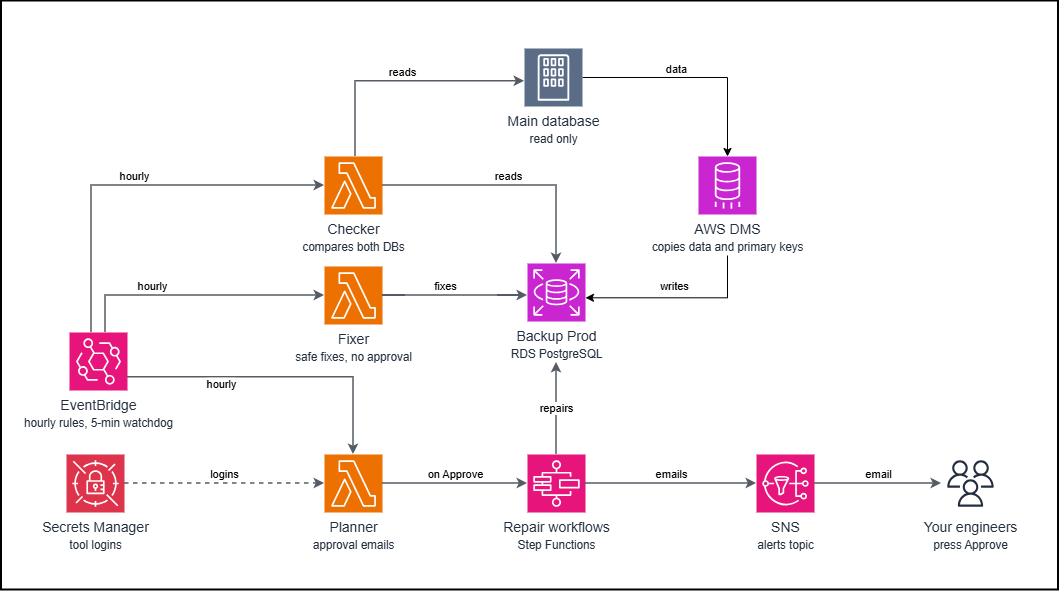
Diagram 1: the full picture. DMS keeps copying data from the main database into the backup. Around it, three small tools run every hour: a checker that compares both databases, a fixer that repairs low-risk differences, and a planner that asks a person for approval before anything riskier. Approved repairs run as a workflow, and every email goes through SNS.
How to read it: follow the arrows from EventBridge, which starts each tool on a schedule. The checker only reads. The fixer and the repair workflows are the only parts that write, and they write only to the backup database. The main database is never changed.
Each tool exists for a specific failure:
The checker closes the visibility gap. It compares the system catalogs of both databases, so a missing column or index shows up within the hour, not weeks later. It remembers its last result and emails only on change, so the inbox stays quiet when nothing has happened.
The fixer handles the routine. For a missing foreign key it first rehearses the change in a step that is rolled back, then adds one key per run and asks DMS whether it is still healthy. If DMS shows a problem, the fixer removes the key, pauses itself and sends an alert. It never turns itself back on; a person must.
The planner and the approval gate handle the risky. A new column means pausing replication and reloading a table, which should never happen silently. The planner emails exactly what will change. The link works once, expires in 24 hours, and opening it changes nothing. Only the Approve button starts the repair.
The table guard closes the original blind spot. It reads every DMS table state each hour, so a suspended table can no longer sit unnoticed.
How it works: one repair, start to finish
Here is what happens when the main database gains a new column.
- The hourly checker sees the column on the main database but not on the backup, and reports it.
- The planner emails an approval request describing exactly what will change.
- A person presses Approve. This records a short-lived approval (two hours) inside the backup database and starts the repair workflow.
- Lock. A marker in Parameter Store means only one repair can run at a time. A second request is refused, with an email.
- Preflight. Before anything is touched, the workflow confirms three things. DMS is healthy: the task is running, every table is complete and none is suspended. A valid approval exists. And the automatic fixer is idle.
- DMS is paused for a few minutes, the column is changed, and DMS is resumed.
- That one table is emptied inside a single database transaction and reloaded by DMS from the main database. Only that table is affected.
- Verify. Row counts on the two databases are compared.
- The approval is withdrawn, the lock is released, and a success email goes out.
If any step fails, the order of recovery is fixed. Replication is resumed first, then the approval is withdrawn, the lock is released, and an "Action needed" email is sent. The main database is never touched.
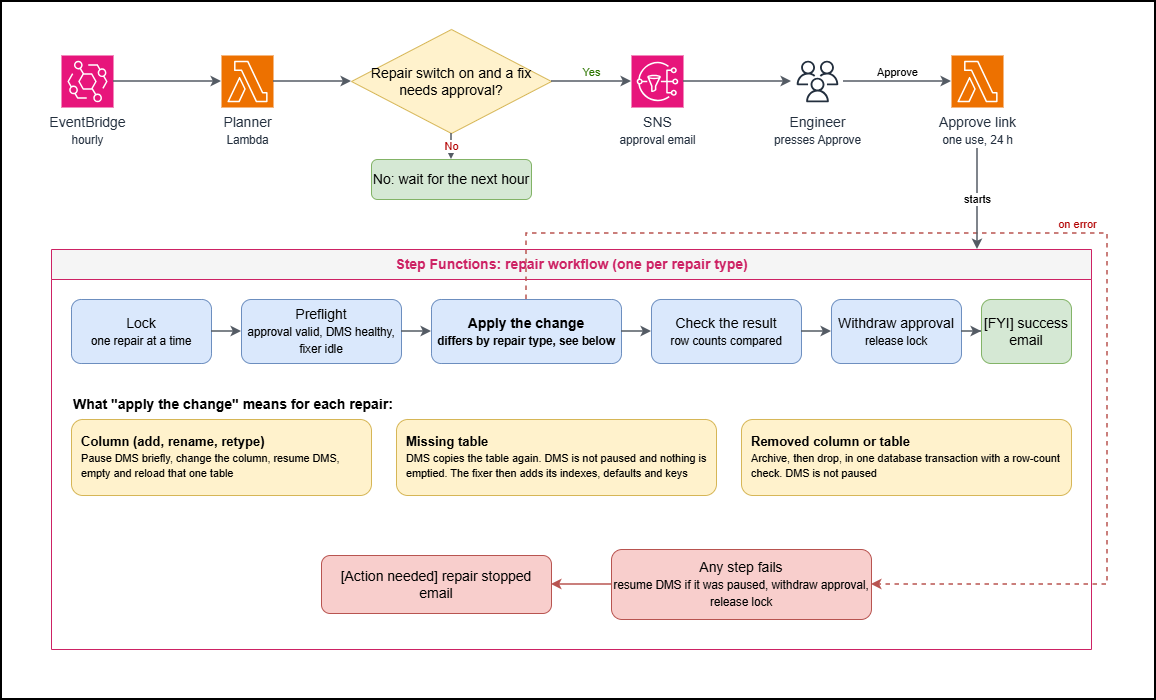
Diagram 2: the repair workflow. Every repair follows the same path. The planner asks for approval, an engineer presses Approve, and a workflow locks out other repairs, runs its safety checks, applies the change, checks the result and releases everything. Only the "apply the change" step differs by repair type. A failure on any step takes the red path and always ends with a clear email.
As Diagram 2 shows, the same path covers the other repairs, and only the apply step changes. A missing table is copied again by DMS, and the fixer then restores its defaults, indexes and keys. A removed column or table is archived and dropped in a single transaction, with a row-count check, so if anything fails nothing is removed. Type changes are tested first, using a rolled-back change on the backup, and the approval email is only sent if the test passes. A rename is only proposed when the old and new columns match in type and settings, and the email shows both names.
Every email is tagged: [OK] needs nothing, [FYI] is worth a read, [Action needed] means a person must look. Each ends with a technical block for engineers.
Proof it holds. We tested the system the way it fails in real life, not just the happy path:
- A repair with no approval, an expired approval, a refused statement, timeouts while stopping, resuming and reloading, and a repair cut off mid-run all ended safely, with replication running and a failure email sent. After the cut-off run, the watchdog restored replication in about three minutes.
- We repaired columns, renames, type changes and a deleted table, and compared a data fingerprint of each table before and after. They were identical every time.
- A simulated replication problem after adding a foreign key made the fixer remove the key and pause itself.
- On October 27 we compared the two databases again: all 72 tables had identical row counts, and columns, indexes, foreign keys, uniqueness rules and defaults all matched.
Where we left things
The client now has:
- An hourly, plain-English answer to "does the backup match production?"
- Automatic repair for routine differences, and one-click approval for the rest.
- A guard against the silent failure that started it all.
- A runbook that lists every email, what it means and what to do, with a diagram of each workflow.
- Master switches that stop all repairs instantly. Setting the repair switch to off also blocks any approval link already sent.
By design, a few changes stay with an engineer, such as changed enum values and triggers. The system is conservative where a wrong automatic change would be costly.
We also recommended that the client apply each release's database changes to the backup as part of deployment, which prevents most drift at the source.
Why this approach worked
The client didn't need a new replication platform. DMS does what it is built to do, moving data. What was missing was the layer around it: checking structure, noticing a stalled table, and repairing safely.
Three choices made the difference. We never wrote to the source database. We kept a person in the loop for anything that could affect data. And we made every repair fail safe, so a problem ends in a clear email, never a surprise.
That's the standard we hold every engagement to: solve the problem the client actually has, with the least new machinery needed to do it properly.
Running live replication on AWS DMS and not sure your copy is really in step? Metasips helps engineering teams verify and protect what they've already built, using proven AWS services before reaching for anything new. Get in touch, and let's check your replica before your customers rely on it.