

Who we worked with
Our client is an India-based online marketplace that moved its backend API to AWS. The API runs on a small group of virtual servers that grows when traffic rises and shrinks when it falls. They wanted every release to reach every server, without anyone keeping a list of servers or logging in to update them. We're keeping their identity anonymous at their request, so we'll call them "the client" here.
The problem: a fleet that never stays the same size
Deploying to a fixed set of servers is simple: a script loops over known addresses. An auto-scaling fleet breaks that approach in three ways.
The list keeps changing. A server launched an hour ago is not in last week's list. A hand-kept list is wrong as soon as the fleet scales.
New servers start from an old image. A machine image holds the code from the day it was built. A server launched today starts with that older code, not with today's release.
Updating everything at once is risky. A faulty release pushed to every server together takes the whole service down with it.
The question we set out to answer was:
How do we make sure every server, including the ones that don't exist yet, ends up on the current release, without manual steps and without putting the service at risk?
Starting point: what we were working with
| Area | Situation |
|---|---|
| Fleet | Servers managed by an Auto Scaling group, spread across two Availability Zones behind a load balancer |
| Access | No inbound remote-login access to any server, by design |
| Image | A prebuilt machine image, rebuilt only occasionally |
| Releases | Each release packaged once and stored in object storage, with a single pointer recording the current release |
| Configuration | Application settings and credentials held in a secrets store, never inside the image or the repository |
The security rule shaped the design. With no inbound remote login, the usual "log in and run the update" approach was not available. Deployment had to be a command sent through a managed service and carried out by an agent on each server.
What we did: let the platform find the servers
We didn't build a server registry or a custom orchestrator. We used what the platform already provides.
1. Target servers by a tag the platform maintains.
Every server that Auto Scaling launches automatically carries a system tag naming its group. The deployment command, sent through AWS Systems Manager, selects its targets with a tag selector on that tag. Nobody maintains the tag, so it can't be forgotten. Any server in the group, old or new, matches the selector.
2. Update one server at a time.
The command runs with a concurrency of one and stops on the first failure. At any moment, the other servers carry production traffic.
3. Make each server verify its own update.
The script on each server follows a fixed order:
| Step | What happens |
|---|---|
| Check | Confirms there is enough free disk space before starting |
| Fetch | Downloads and unpacks the release |
| Prepare | Refreshes configuration from the secrets store and generates what the application needs |
| Switch | Moves a "current release" link to the new version |
| Restart | Restarts the service |
| Verify | Waits until the application answers a local health check |
| Recover | If it doesn't, restores the previous release automatically |
4. Gate the rollout on the public health check.
After every server is updated, the pipeline requires several consecutive healthy responses from the public endpoint. Only then does it record the new release as the current one.
5. Let new servers catch up on their own.
A new server starts from the machine image. At first boot it reads its configuration from the secrets store, reads the recorded current release, and installs it with the same script. When it passes the load balancer's health checks, it starts taking traffic on the current release.
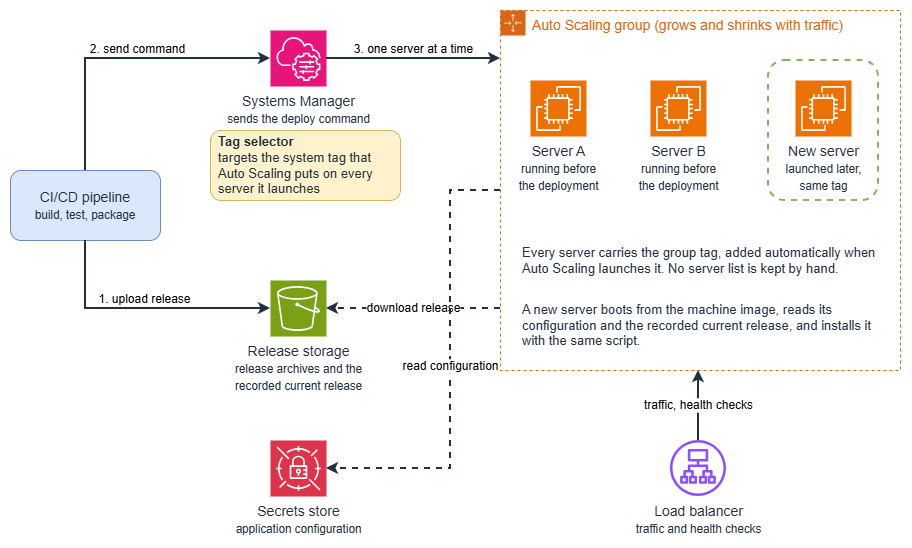
Diagram 1: the full picture. The pipeline stores each release, then sends one command that finds servers by the group tag, so a server launched later is found automatically.
How to read it: follow the arrow from the pipeline to the command service, then to the tag selector. The selector, not a list, decides which servers receive the command.
How it works: one deployment, start to finish
- A push to the main branch starts the pipeline. It runs the build and the tests, and a failure stops it.
- The release is packaged and stored in object storage.
- The pipeline sends a command to every server carrying the group tag, one at a time.
- On the first server, the script runs its check, fetch, prepare, switch, restart and verify steps. If verification fails, that server returns to its previous release and the rollout stops.
- The command moves to the next server, and so on through the group.
- The pipeline calls the public health endpoint until it gets several consecutive healthy responses.
- Only then does it record the new release as current.
If a server is replaced after failing health checks, or Auto Scaling adds one later, the new server follows step 5 of the previous section. It reads the recorded release at boot, installs it, and joins the load balancer.
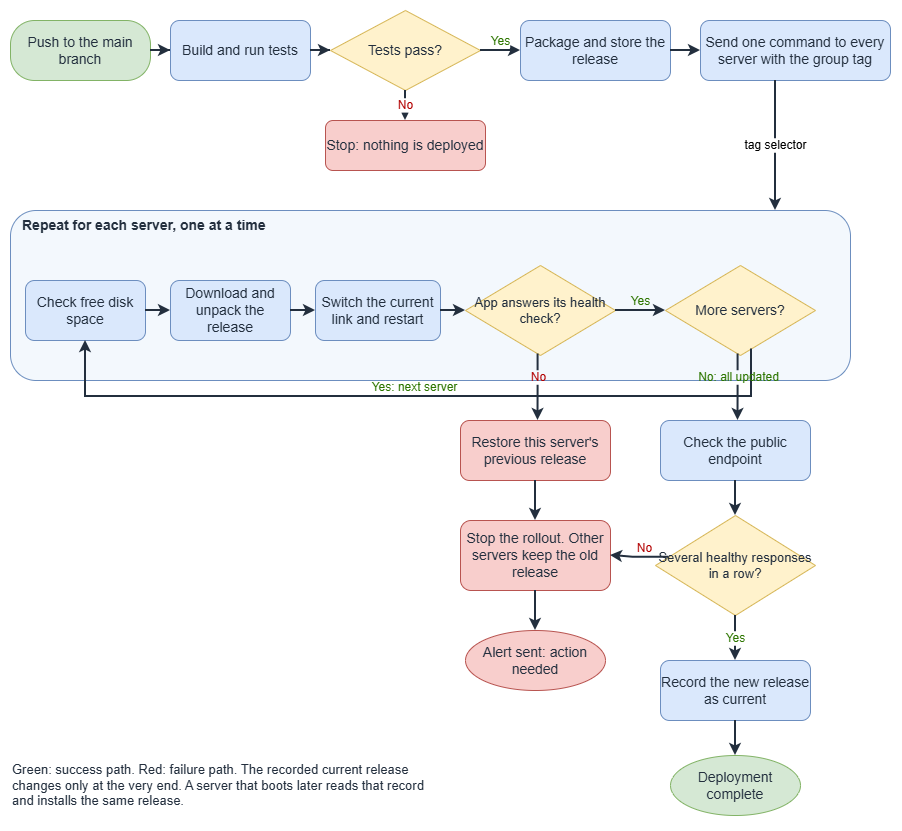
Diagram 2: one deployment, start to finish. Each server is updated, checked and either kept or rolled back before the next one starts. The recorded current release changes only after the whole fleet passes the final check.
| Situation | What happens |
|---|---|
| A server was running before the deployment | It's updated in turn, one at a time |
| A server launched between two deployments | It boots on the recorded current release, and the next deployment updates it again |
| A deployment starts after a new server has joined | The tag selector picks it up automatically, with no list to change |
| An update fails on one server | That server returns to its previous release, the rollout stops, and the others keep the old release |
| A server is replaced after failing health checks | The replacement installs the recorded current release at boot |
Proof it holds. We tested the behaviours we could reproduce:
- A server launched by a scale-out booted on the current release, shipped its metrics and logs, passed its health checks and took traffic.
- The same server was removed automatically when traffic dropped.
- Each scaling event produced exactly one notification.
- A failed health check on a server triggered replacement, and the replacement installed the current release.
Where we left things
The client now has:
- A deployment that finds every server in the group without any list to maintain.
- One-at-a-time updates with an automatic local rollback.
- New servers that converge on the current release by themselves at boot.
- A written procedure for manual rollback to an earlier release.
A limit we documented, not hid. The "current release" record changes only after the whole rollout passes its health gate. A server that launches during a rollout therefore boots on the previous release, and it isn't in that rollout, because it wasn't part of the target set when the command started. The next deployment corrects it. We did not run a deployment at the same moment as a scale-out, so this comes from how the pipeline is designed, not from a reproduced failure.
The client's team handles it with a simple routine:
- After any deployment or scaling event, compare the release on each server with the recorded one, and re-run the deployment if they differ.
- Avoid deploying at peak hours, when scaling is most likely.
Options to close the gap, if it ever matters:
- Record the new release before the rollout starts, so a server launched mid-rollout boots on it. The risk is booting a release that later fails its health gate.
- Run a short reconciliation step after each rollout that checks every server in the group and updates any that differ.
- Pause the launch process during a rollout. This keeps the fleet consistent, but it can reduce capacity during a traffic spike.
Why this approach worked
The client didn't need a custom deployment platform or a server inventory. The cloud already knows which servers belong to the group, and it already tags them. What was missing was using that fact deliberately.
Three choices made the difference. We selected servers by something the platform maintains, so there was nothing to keep in step. We let each server verify and, if needed, undo its own update, so a failure stayed contained. And we gave new servers a way to catch up by themselves, so the deployment tool wasn't the only thing keeping the fleet consistent.
We also wrote down the one gap that remains. A solution that says where it stops is easier to trust than one that claims to cover everything.
That's the standard we hold every engagement to: use what the platform already provides, and describe it honestly.
Running an auto-scaling fleet and not sure every server is on the same release? Metasips helps engineering teams verify and tighten the deployment paths they've already built, using proven AWS services before reaching for anything new. Get in touch, and let's check your fleet before your next release.